

 Deutsch
 Español
 Français
 Hrvatski
 Italiano
 Polski
 Português (BR)
Delete Old Plan Versions in the Webapp
Overview
You can delete one old version of a plan, or every old version in the project at once.
Every plan version counts against your account's plan quota, so clearing out the versions nobody needs any more makes room for new drawings. Also see Pricing and Subscription.
Access & Permissions
Delete a Specific Plan Version
A single version is deleted from the plan's version history. The current version cannot be deleted, and neither can one that is waiting for approval.
Delete a Plan With All Its Versions
To remove a plan completely, including its current version, delete the plan itself in the Plans section. This only works while no tickets are pinned to it.
Delete All Old Plan Versions of a Project
If you are sure that nobody needs the older versions any more, you can delete all of them in one go. Each plan keeps its current version.
To delete all old plan versions:
- Click Projects.
- Click the project to open it.
- Open the More menu next to Duplicate project.
- Click Delete old plan versions.
- Type
Deleteto confirm. - Click Delete old plan versions.
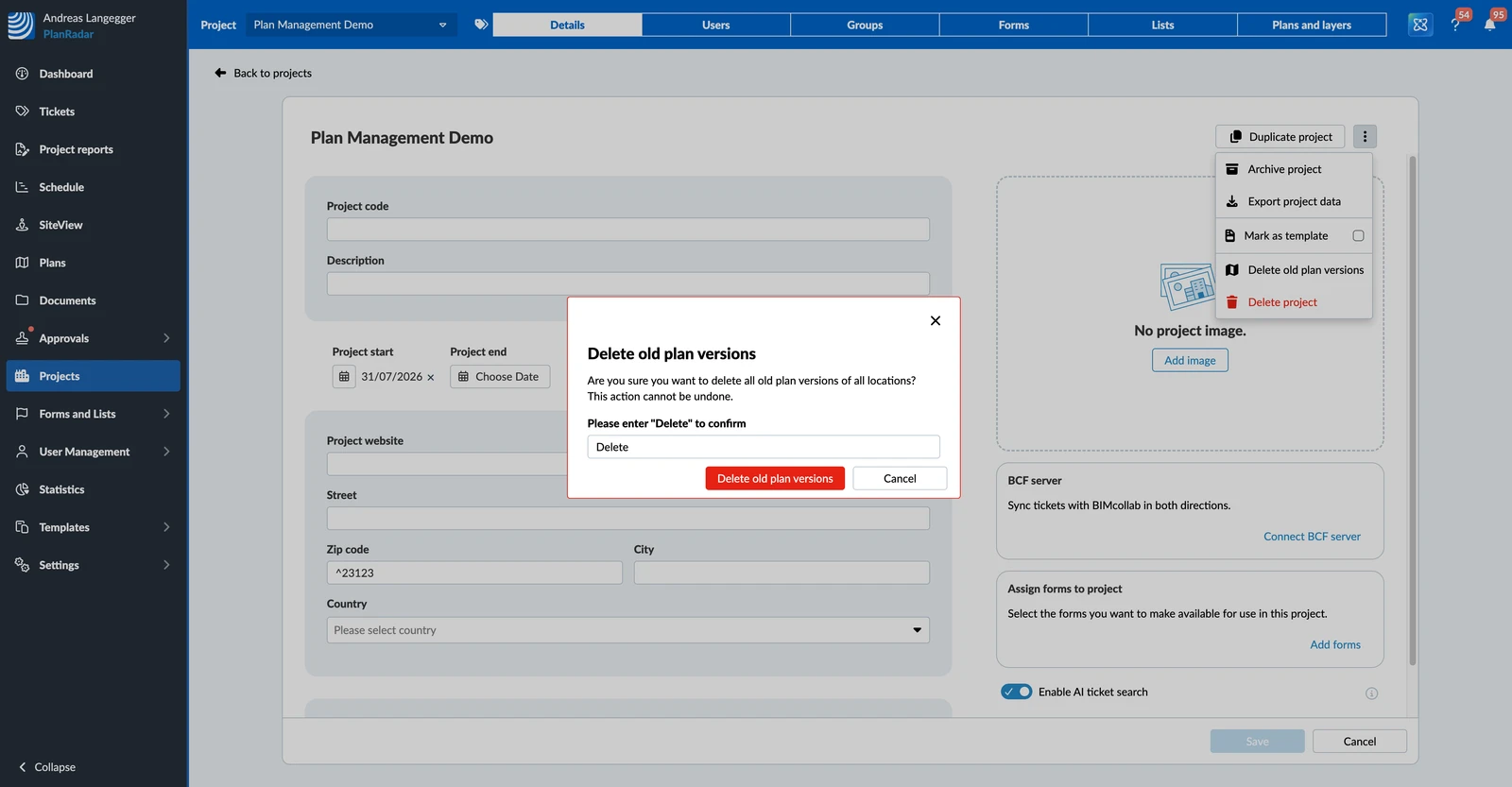
The dialog tells you how many old versions will go, or that there are none to delete.
Updated September 3, 2026